




Description
Free Ecommerce Profit & Fee Calculator
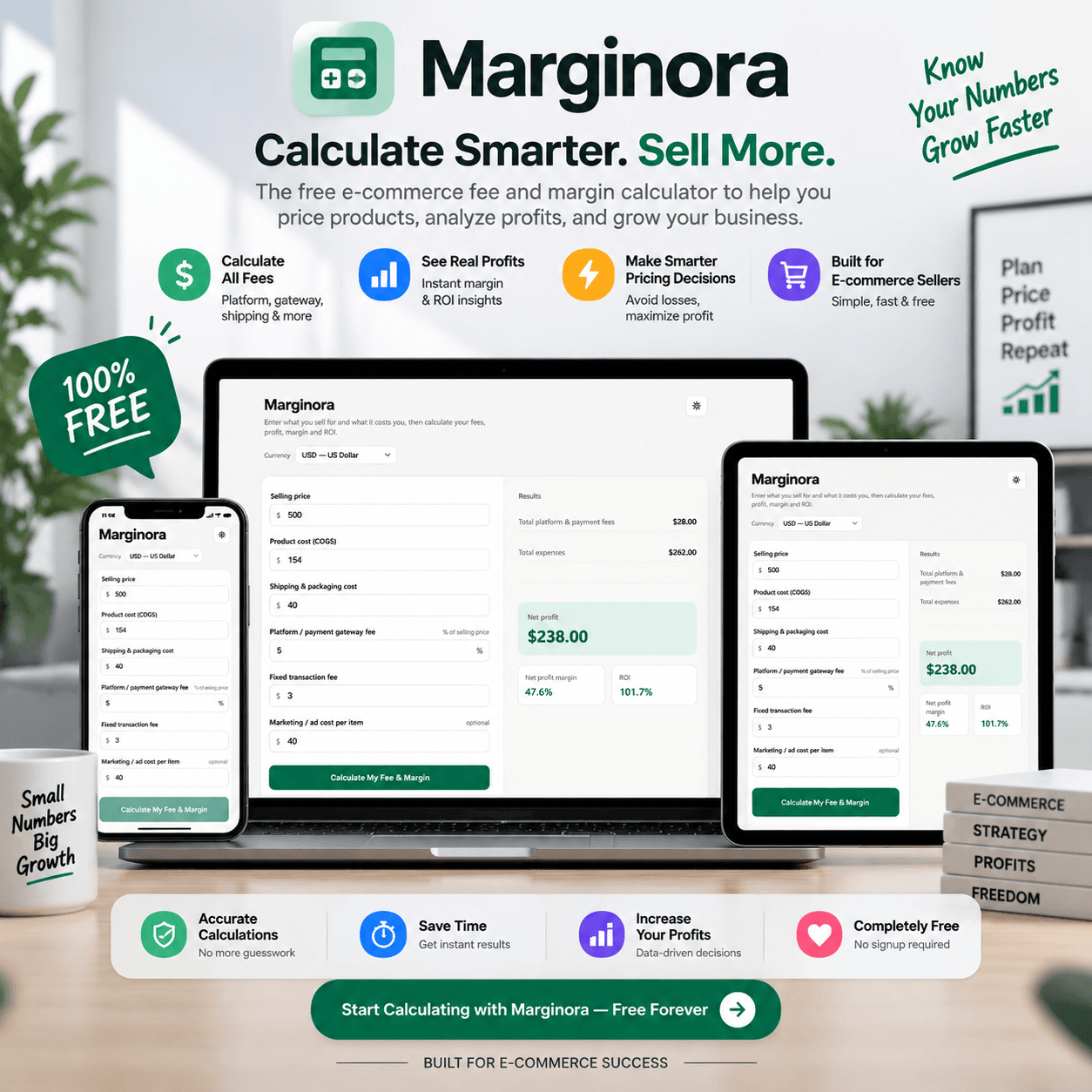
Running an online store means more than checking your selling price and product cost. Platform fees, payment fees, shipping, packaging, transaction charges, and advertising costs can quickly reduce your actual profit. Marginora’s Free Ecommerce Profit & Fee Calculator helps online sellers calculate the estimated profit and profit margin for each product before making a sale.
Enter your selling price, product cost or COGS, shipping and packaging costs, platform and payment gateway fees, fixed transaction fees, and advertising cost per item to see how much you can potentially earn from each sale.
Whether you sell products through an online store, marketplace, or other ecommerce channel, Marginora gives you a simple way to understand your product-level costs and profit.
Calculate Your Ecommerce Profit in One Place
Use this ecommerce profit calculator to bring your main selling costs together in one calculation.
You can enter:
- Selling Price – Enter the price customers pay for your product.
- Product Cost / COGS – Add the cost of making or purchasing the product.
- Shipping & Packaging Cost – Include shipping, packaging, and related fulfillment costs.
- Platform & Payment Gateway Fee – Account for marketplace, ecommerce platform, or payment processing fees.
- Fixed Transaction Fee – Add a fixed fee charged on each transaction.
- Marketing Ad Cost per Item – Include the advertising cost associated with selling each product.
Once your costs are entered, you can better understand the profit left from each sale.
Why Use an Ecommerce Profit Calculator?
A product can have a high selling price and still generate a small profit.
Your real ecommerce profit depends on more than the difference between selling price and product cost. Shipping, payment processing, platform fees, transaction charges, and advertising can all affect your final margin.
Marginora helps you look at these costs together so you can make better pricing and product decisions.
Check Your Profit Before You Sell
Before listing or promoting a product, use Marginora to estimate how much profit may remain after your main selling costs.
Understand Your Product Costs
Include COGS, shipping, packaging, fees, transaction charges, and advertising costs in one place instead of calculating them separately.
Calculate Profit Margin
Use the calculated results to understand the relationship between your revenue, costs, and estimated profit margin.
Review Advertising Costs
Advertising can have a major effect on product profitability. Adding your ad cost per item helps you see how marketing expenses affect your potential profit.
Free Ecommerce Fee Calculator
Marginora also works as an ecommerce fee calculator by helping your account for platform fees, payment gateway fees, and fixed transaction fees when estimating your product profit.
Instead of looking only at your product cost, you can include the fees that may reduce your earnings from every sale.
This can be useful for ecommerce sellers who want to compare different products, pricing levels, or selling costs.
Free Ecommerce Profit Margin Calculator
Your selling price is only one part of your ecommerce business.
Your actual margin can change when product costs, shipping, platform fees, payment processing fees, or advertising expenses increase.
With Marginora’s ecommerce profit margin calculator, you can include these costs in your calculation and get a clearer view of your estimated product profitability.
Supports 10 Currencies
Marginora supports 10 currencies, making the calculator useful for sellers who work with different supported currencies.
Select a supported currency and enter your product and selling costs to calculate your estimated ecommerce profit in that currency.
Who Can Use Marginora?
Marginora is designed for:
- Ecommerce store owners
- Online sellers
- Marketplace sellers
- Small business owners
- Product-based businesses
- Drop shipping sellers
- Entrepreneurs
- Freelance ecommerce operators
- Anyone who wants to check product profitability
When Should You Use an Ecommerce Profit Calculator?
You can use Marginora before launching a product, changing your price, starting an advertising campaign, or reviewing the profitability of an existing product.
For example, if a product sells for $50, your COGS is $20, shipping and packaging cost $5, platform and payment fees total $4, the fixed transaction fee is $1, and advertising costs $5 per item, your actual profit is very different from simply calculating $50 minus $20.
That is why including your main selling costs gives you a more useful estimate of product profitability.
Make Pricing Decisions with Better Cost Information
Knowing your costs can help you avoid pricing a product too low.
Use Marginora to test different selling prices and see how your estimated profit changes. You can also review how shipping, fees, and advertising costs affect your potential earnings.
The goal is simple: understand your costs, estimate your profit, and price your products with better information.
Try Marginora Free
Ready to check how much you can make from your next product?
Use the Free Ecommerce Profit & Fee Calculator to enter your selling price, COGS, shipping and packaging costs, platform and payment fees, transaction fees, and advertising cost per item.
Calculate Your Product Profit Now
Start using Marginora for free Download Now
No complicated spreadsheet is required. Enter your numbers, calculate your estimated profit, and review your product economics in one place.
Frequently Asked Questions
What is an ecommerce profit calculator?
Is Marginora's ecommerce profit calculator free?
What costs can I include in Marginora?
Can I calculate ecommerce profit after fees?
Can I include advertising costs in the profit calculation?
Does Marginora support different currencies?
What is COGS in ecommerce?
Related Products:
- Buy Editable Weight Loss Planner Template: Track Goals & Stay Fit
- Student Planner Template: Organize Your Studies and Reach Goals
- Editable Certificate Template Canva 100% free Today
✔ Verified Internal Resource







Reviews
There are no reviews yet.